AI
The document mainly introduces how to use the TORQ-Toolkit to perform model conversion and deploy the converted models onto the chips.
TORQ-Toolkit is designed for the A200/A210 hardware platforms.
Environment Preparation
Installing TORQ-Toolkit
TORQ-Toolkit currently supports the x86 version. The users can directly deploy the development environment in Docker.
Installing Docker
Note: If you have installed Docker, skip this step.
-
Please follow the official manual for installing Docker. For more details, please see Docker Official Manual.
-
Add the user to the Docker group.
# Create the docker group
sudo groupadd docker

# Add the user to the docker group
sudo usermod -aG docker $USER

# Apply the group changes
newgrp docker

# Verify running Docker without sudo
docker run hello-world
The returned results are shown below.
Unable to find image 'hello-world:latest' locally
latest: Pulling from library/hello-world
719385e32844: Pull complete

Digest:  sha256:88ec0acaa3ec199d3b7eaf73588f4518c25f9d34f58ce9a0df68429c5af48e8d
Status: Downloaded newer image for hello-world:latest
Hello from Docker!
Launching the TORQ-Toolkit Image
-
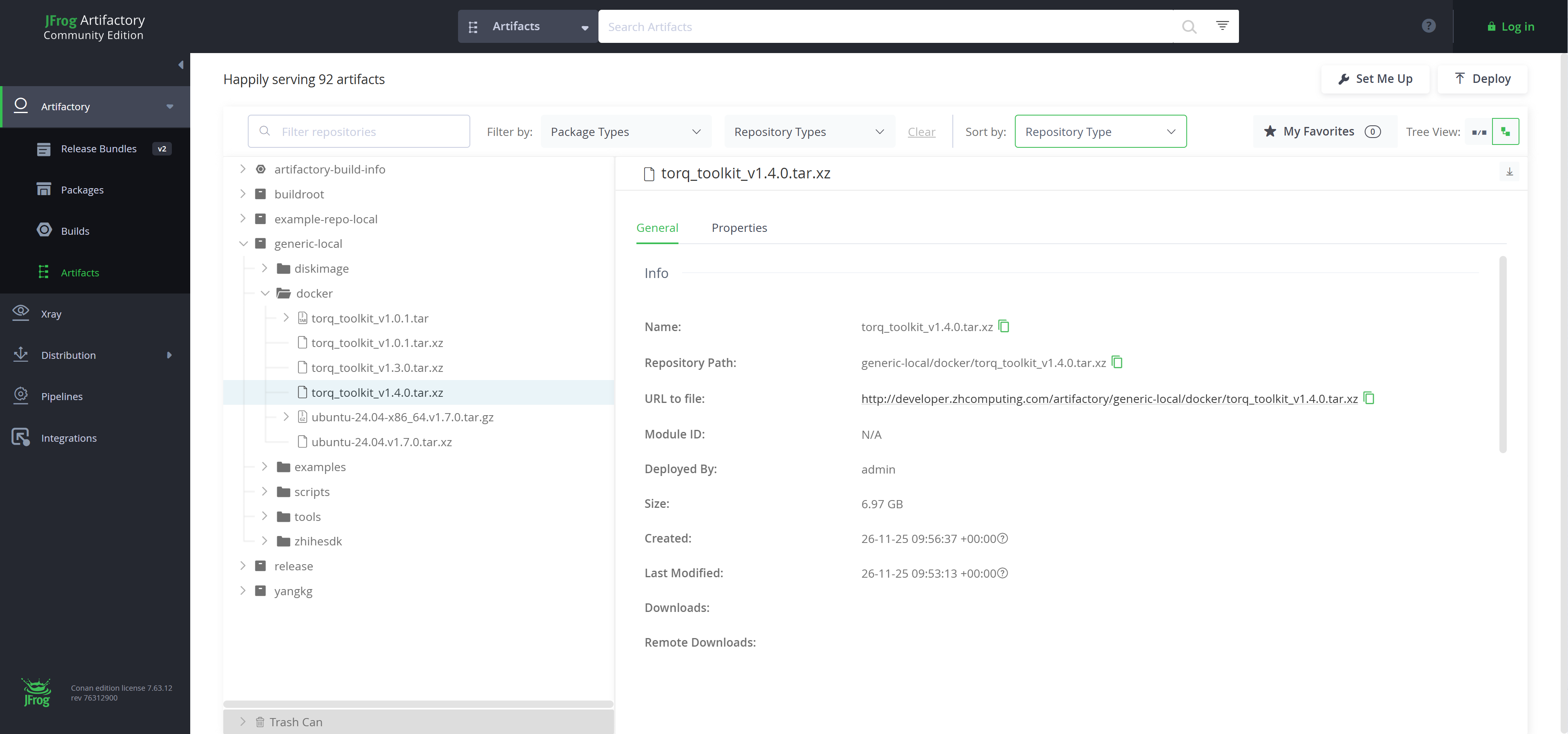
Image preparation. Download and load the TORQ-Toolkit Docker image, for the latest version, please see Artifactory.
# sample commands to prepare the image
wget http://developer.zhcomputing.com/artifactory/generic-local/docker/torq_toolkit_v1.4.0.tar.xz
xz -dc torq_toolkit_v1.4.0.tar.xz | docker load

# Check Docker image
docker images
The example returned TORQ-Toolkit image is shown below.
REPOSITORY        TAG         IMAGE ID       CREATED         SIZE
torq_toolkit v1.4.0 be61db9cefaa 1 hours ago 16.4GB -
Run Docker image to enter the bash shell.
# Run TORQ-Toolkit image
docker run -it torq_toolkit:v1.4.0 /bin/bash -
Check TORQ-Toolkit version.
# Check TORQ-Toolkit version
pip3 show torq_toolkit
The sample returned results are as follows.
Name: torq-toolkit
Version: 1.4.0
Summary: A toolkit for model conversion, optimization and quantization
Home-page: https://github.com/username/torq-toolkit
Author: TORQ Team
Author-email: torq-support@example.com
License:
Location: /usr/local/lib/python3.12/dist-packages
Requires: numpy, pyyaml, torch, tqdm
Required-by:
NPU Environment Preparation on the Target Device
About how to flash the development board, please see Basic Quick Start Guide.
SSH credentials for the board:
- Username: zhihe
- Password: zhihe
- Username: root
- Password: (None)
Verifying the NPU Driver Version
Check the NPU driver version.
Caution:
Please flash the latest board image.
# For A210
dmesg | grep -i VIPLite

# Expected output
VIPLite driver version 2.1.3.0

# For A200
dmesg | grep -i vha_plat_probe

# Expected output
vha_plat_probe: Version VHA DT driver version : REL_3.8-c16140200
Installing/Updating the TORQ Runtime Library
libtorqrt_<TARGET_PLATFORM>.so is the TORQ Runtime library used for on-device LLM.
Caution:
Please ensure that TORQ Runtime library and TORQ-Toolkit are at the same and the latest version.
-
Check
libtorqrt_<TARGET_PLATFORM>.solibrary version.# Check the libtorqrt.so library version (example for A210)
strings /usr/lib/riscv64-linux-gnu/libtorqrt_a210.so | grep -i "torq runtime"
# Outputs the libtorqrt library version: torq runtime version: 1.4.0 (Nov 25 2025 21:26:36) -
Ensure that the
libtorqrt_<TARGET_PLATFORM>.solibrary is updated to the same version as the TORQ-Toolkit if a version mismatch is detected.# Example for A210
scp 3rdparty/torq/linux-a210/lib/libtorqrt_a210.so root@192.168.0.23:/usr/lib/riscv64-linux-gnuNote:
If
libtorqrt_a210.sohas been installed in a different directory (e.g.,/mnt/lib), the users can also specify it by setting the environment variable for dynamic library searching.export LD_LIBRARY_PATH=/mnt/lib:$LD_LIBRARY_PATH
Installing/Updating the TORQ LLM Runtime Library
libtllm_a210.so is the TORQ LLM Runtime library for on-device LLM.
Caution:
- Please ensure that TORQ Runtime library and TORQ-Toolkit are at the same and the latest version.
- TORQ LLM Runtime library is only compatible with the A210 hardware platform.
-
Check the
libtllm_a210.solibrary version.# Check the libtllm_a210.so library version
strings /usr/lib/riscv64-linux-gnu/libtllm_a210.so | grep -i "tllm runtime"
# Outputs the libtllm_a210 library version: tllm runtime version: 1.4.0 (Nov 26 2025 08:43:44) -
Ensure that the
libtllm_a210.solibrary is updated to the same version as the TORQ-Toolkit if a version mismatch is detected.scp 3rdparty/torq/linux-a210/lib/libtllm_a210.so root@192.168.0.23:/usr/lib/riscv64-linux-gnuNote:
If
libtllm_a210.sohas been installed in a different directory (e.g.,/mnt/lib), the users can also specify it by setting the environment variable for dynamic library searching.export LD_LIBRARY_PATH=/mnt/lib:$LD_LIBRARY_PATH
Examples
TORQ provides examples for various models, including MobileNet for image classification and YOLOv5 for object detection.
torq-model-zoo project has been open-sourced on Gitee.
# Download torq-model-zoo example project
git clone https://gitee.com/zhcomputing/torq-model-zoo.git

# Download the required dependencies
cd torq-model-zoo
./scripts/download_ucann.sh
MobileNet Model Deployment Example
The section takes MobileNet as an example to demonstrate how to get started with model conversion and on-device deployment.
Model Preparation
Run the download script to get the result of mobilenetv2-12.onnx file.
# Enter examples/mobilenet/model directory
cd examples/mobilenet/model

./download_model.sh
Model Conversion
Execute the model conversion. The converted model is saved by default to ../model/mobilenet_v2.torq.
# Enter examples/mobilenet/python directory
cd ../python

python3 convert.py --model ../model/mobilenetv2-12.onnx --target a210 --dtype u8
On-Device Deployment
-
Compile the model-related files.
# Back to the torq_model_zoo root directory
cd ../../../

./build-linux.sh -t a210 -d mobilenet
Build output:
./install/a210_linux/torq_mobilenet_demo -
Copy the executable file to the target device.
# For <TARGET_PLATFORM> values, please see torq.config()
scp -r ./install/a210_linux/torq_mobilenet_demo root@<IP_ADDRESS>:

# Sample code:
scp -r ./install/a210_linux/torq_mobilenet_demo root@192.168.0.23: -
Access the device and execute the following commands.
./torq_mobilenet_demo model/mobilenet_v2.torq model/bell.jpgThe returned values are as follows.
[494] score=0.991719 class=n03017168 chime, bell, gong
[469] score=0.003797 class=n02939185 caldron, cauldron
[442] score=0.001032 class=n02825657 bell cote, bell cot
[577] score=0.000643 class=n03447721 gong, tam-tam
[406] score=0.000451 class=n02699494 altar
Yolov5 Model Deployment Example
The section takes Yolov5 as an example to demonstrate how to get started with model conversion and on-device deployment.
Model Preparation
Run the download script to get the result of yolov5s_relu.onnx file.
# Enter the examples/yolov5/model directory
cd examples/yolov5/model

./download_model.sh
Model Conversion
Execute the model conversion. The converted model is saved by default to ../model/yolov5.torq.
# Enter the examples/yolov5/python directory
cd ../python

python3 convert.py --model ../model/yolov5s_relu.onnx --target a210 --dtype u8
On-Device Deployment
-
Compile the model-related files. Build output:
./install/a210_linux/torq_yolov5_demo.# Back to torq_model_zoo root directory
cd ../../../
./build-linux.sh -t a210 -d yolov5 -
Copy the executable file to the target device.
# For <TARGET_PLATFORM> values, please see torq.config()
scp -r ./install/<TARGET_PLATFORM>_linux/torq_yolov5_demo root@<IP_ADDRESS>:

#Sample code:
scp -r ./install/a210_linux/torq_yolov5_demo root@192.168.0.23: -
Access the device and execute the following commands.
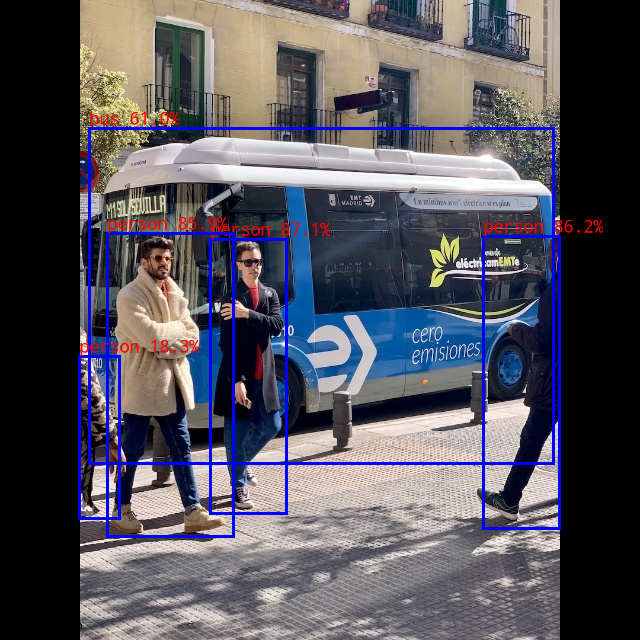
./torq_yolov5_demo model/yolov5.torq model/bus.jpgIn this sample, the detected labels and their corresponding confidence scores for the test image will be printed as shown below.
person @ (210 239 286 513) 0.871
person @ (483 236 559 528) 0.862
person @ (107 233 233 536) 0.859
bus @ (89 128 553 463) 0.610
person @ (79 356 119 518) 0.183
Note: The results are subject to the variations across platforms, tool versions, or drivers.